
Add Natural Gestures and Expressions to Image-to-Video Motion
A still portrait can show how something looks, but natural movement can show who the person is, what they are paying attention to, and what they are trying to convey in their emotions. A smile, a slight turn of the head, or a relaxed hand gesture can drastically alter the meaning of a picture. But too much movement will make an otherwise convincing character look unnatural.
Dreamina AI is an AI that can convert photos into animated videos based on prompts and visual references. It has models for Seedance that can generate movement, and Seedance 2.5 has reference-guided generation and better character consistency. Natural animation requires good source quality, a clear prompt, and fine-tuning. By knowing these elements, characters can be created that are expressive in terms of their movement that is appropriate for the way they look and what they are doing.
Understand the Elements of Natural Human Movement
Facial expressions can convey emotion by smiling, raising eyebrows, looking a certain way, or by slight tension in the face. Head turns, nodding, and gaze changes are small and indicate attention without overpowering the scene. Hand gestures such as waving, pointing, and open palms can help to reinforce verbal or nonverbal messages. Lean forward, relax shoulders, etc. – show confidence, curiosity, hesitation. Timing also plays a part, as slow movements and short pauses can be more convincing. These elements can be animated with Dreamina AI, but some adjustments might be needed to ensure natural coordination.
Match the Gesture to the Character’s Emotion and Purpose
All gestures should convey intent rather than activity for its own sake. A friendly greeting could include eye contact, a smile, and a wave. A character that thinks could look away and then back up to the camera. A presenter may have a consistent posture and remove any unnecessary hand movements. The same gesture may mean different things depending upon facial expression, timing, and context. Dreamina image to video workflows convert these instructions into scenes with animation using prompts and references. Explain an emotional sequence instead of a list of unrelated expressions; then rework the results if the movements seem overdone.
Steps to Add Natural Gestures and Expressions with Image-to-Video Motion
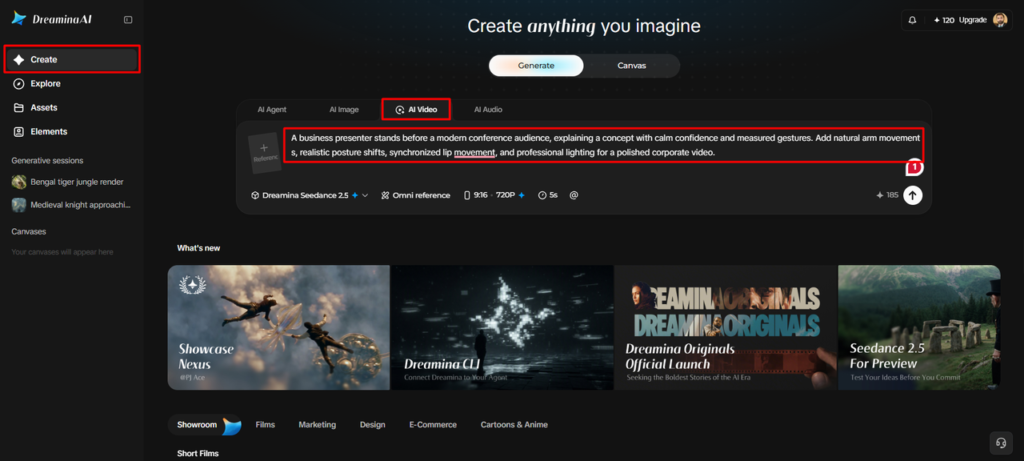
Step 1: Upload your portrait and describe the expressions
- Sign up or log in to Dreamina to start adding lifelike motion to your photo.
- Next, open the “Create” tab from the left menu and select the “AI video” option.
- Upload your portrait, then write a detailed text prompt describing the natural gestures and expressions.
- Add information on video elements, theme, and concept so every movement feels natural and believable.
Step 2: Choose a model and guide the motion
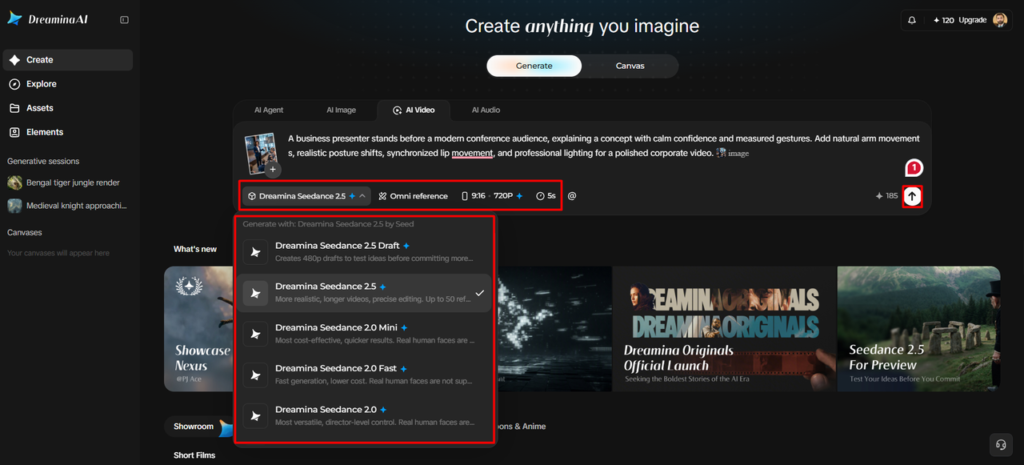
- Begin by choosing a model from the options at the bottom of the dialogue box.
- Choose Dreamina Seedance 2.5, Dreamina Seedance 2.0, or Dreamina Seedance 2.0 Fast for smoother movement.
- Dreamina Seedance 2.0 Mini and Dreamina Seedance 1.0 are also available for quick motion tests.
- Click on “Omni reference” to guide the AI with multiple reference images for accurate results.
- Select a custom aspect ratio and a resolution from the “Aspect ratio” and “Resolution” tabs.
- Finally, click the “Generate” tab and let Dreamina begin creating your expressive and lifelike video.
Step 3: Polish the gestures and export your video
- If you don’t like the results, use “Edit prompt” or “Regenerate” to refine them.
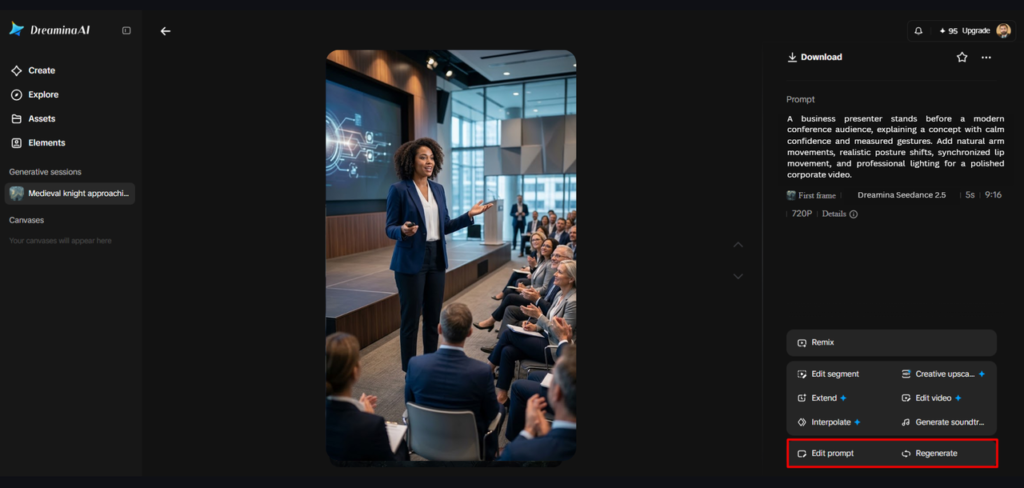
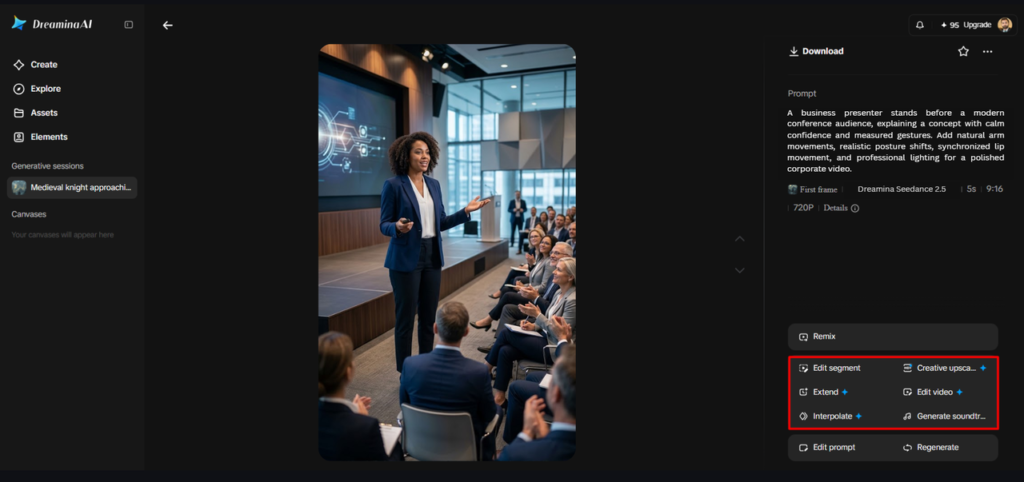
- You can also edit the generated video using the “Edit video” option to adjust expressions.
- Moreover, you can use “Edit segment” to change only one specific part of the clip.
- Use “Extend video” to lengthen your clip when the gesture needs a few more seconds. You can also improve the video quality with “Creative upscale” for sharper faces and details.
- Dreamina gives you complete freedom to edit every small detail of the motion your way.
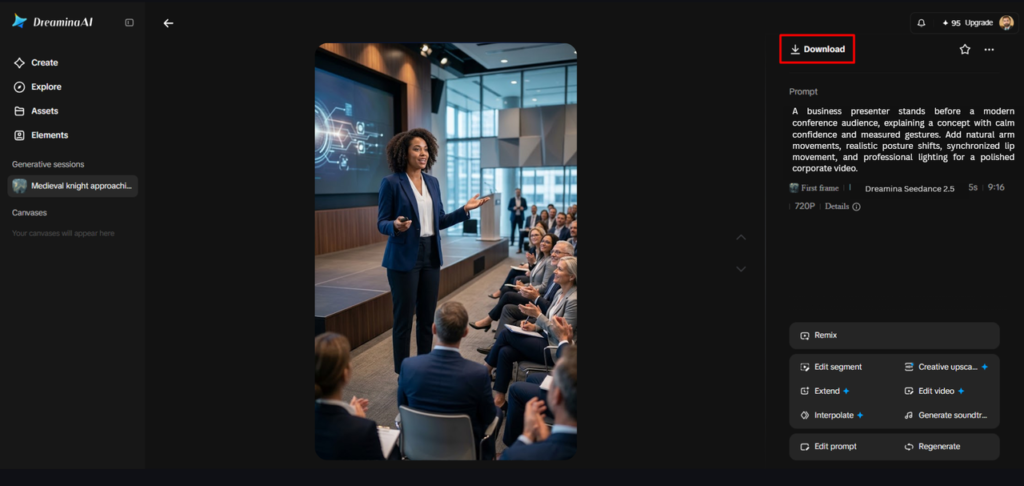
- Finally, click the “Download” tab present at the top right of the main Dreamina interface. This saves the finished video file on your local device for easy sharing or reuse.
Six Techniques for More Natural Gestures and Expressions
- One clear gesture: Give the character one main action; secondary actions only if they serve the purpose of the character.
- No exaggerated emotional changes: Instead of putting multiple emotional changes into one face, subtly show a smile or a raised eyebrow.
- Purposeful eye direction: Identify a character’s gaze (forward, side, or tracking an object).
- Relaxed body language: Discuss natural changes in body position, but avoid distracting shoulder, arm, and torso movement.
- Controlled timing: Describe how the action starts, builds, and ends with pauses as needed.
- Consistent identity: Use clear instructions and appropriate references to reinforce familiar facial features, hairstyles, clothing, and accessories.
Write Motion Prompts That Communicate Performance Clearly
Use descriptive words and phrases to describe behavior, instead of emotion words alone. Rather than asking for happiness, make it clear that you are asking for a gentle smile, relaxed shoulders, and warm eye contact. The distance of the camera can also have an impact on how well the animation portrays emotions. Close-ups will show facial expressions; wider shots will show posture and hand movements. For instance, a cue could be “Character looks at camera, smiles slightly, then hand is lowered naturally. Dreamina Seedance 2.5 offers reference-guided generation with the help of R2V technology. The actual choreography is still dependent on generation results, and clear instructions lead to the intended performance.
Animate Different Character Types With Appropriate Movement
Moderate head movements and expressions are good for photorealistic portraits. It’s important to animate illustrated characters in a way that is true to their proportions and artistic style. Controlled turns are useful for fashion because they highlight the clothing without altering the silhouette. Product Presenters must have meaningful gestures, gaze direction, and believable position of hands. Fantasy characters may use more dramatic moves which correspond to their fictional design. Dreamina AI can be used for various visual concepts, but each outcome will have to be checked for unwanted changes in facial features, accessories, clothing, or proportions.
Recognize and Correct Unnatural Motion
Prompts that highlight one visual facial change can increase the accuracy of rigid expressions. Exaggerated gestures might need less actual movement and fewer actions. Careful inspection of the hand position and contact with other objects should be made for unnatural hands. There may be a need for more reference guidance or regeneration of inconsistent facial details. Explicit instructions about the character’s attention are helpful for unclear gaze direction. When prompted to move slowly and to the end position, abrupt movements may be improved. Dreamina AI provides quick editing and segment-level control options, but significant flaws may still necessitate a second generation.
Evaluate the Final Performance as a Complete Sequence
Examine the first expression and see if it sets the tone. Ensure gestures progress in a logical sequence and movements are seamless. Look at the character’s look and compare it to the original reference, focusing on the facial features and clothing. Make sure camera framing conveys expression and body language. Lastly, view the exported video in its entirety and check for any remaining artifacts prior to publishing.
Conclusion
Character animation in nature requires meaningful gestures, timing, expression, and visual factors. Dreamina AI can take portraits and illustrations and turn them into animated scenes with the help of image references and motion prompts. More coherent results are achieved through focused instructions, appropriate references, and careful refinement than with the addition of movement. Finally, convincing animation means that all gestures are suitable for the scene and character.